# Telegram Bot API 10.4: HTML widgets, explained simply
> Telegram Bot API 10.4 lets a bot put a working interface inside a message. Here is what HTML widgets are, where they work today and where they do not, what else changed on 9 November 2026, and what it means for channel owners, advertisers and bot builders.
Source: https://blogs.onflowads.com/telegram-bot-api-10-4
Author: Onflow Ads Team
Published: 2026-11-22
Section: Telegram advertising
**Key takeaways**
- Telegram Bot API 10.4 came out on 9 November 2026. Its main addition is HTML widgets: small interactive interfaces that a bot can place inside a message.
- A widget can send questions to its bot and get answers, a bot can change a widget without sending a new message, and a shared widget keeps one design across many messages.
- For now widgets work only in the private chat with a bot. Groups, inline mode and forwarding run on Telegram's test server only, and Telegram says a widget cannot be posted in a channel.
- The same update connects widgets to Telegram's Wallet, lets a button answer only the person who tapped it, and lets Telegram Premium users give two of their bots a second username.
- Onflow Ads does not build widgets. It helps with what a bot or a channel needs next: readers from other Telegram channels, through sponsored posts with escrow and free post swaps, with every tap counted.
**Telegram Bot API 10.4** is the update that lets a bot put a working interface inside a message. Telegram calls the new pieces HTML widgets. Before this update a bot could send text, media and buttons. Now it can send something you use right where you read it. Telegram's own examples are a poll whose bars move as people vote, a price ticker and a promo code that copies on a tap.
This guide explains the update in plain words: what a widget is, where it works today and where it does not, what else changed, and what it means if you run a channel, buy ads or build a bot. Every fact links to Telegram's own page, and where Telegram has set a limit we say so.
## What is Telegram Bot API 10.4?
The Bot API is the set of tools developers use to make Telegram bots. Telegram adds to it several times a year and lists every change in a [public changelog](https://core.telegram.org/bots/api-changelog). Version 10.4 is [dated 9 November 2026](https://core.telegram.org/bots/api-changelog#november-9-2026), and Telegram announced it the same day on its Bot News channel.
The announcement opens with one line: "HTML widgets bring custom, dynamic interfaces right into message bubbles". It adds that this gives bots and AI agents a new place for interactive tools, games and workflows. The rest of the update is smaller, and most of it supports the widgets.
| Part of the update | What it does | Who will notice |
| --- | --- | --- |
| HTML widgets | A bot sends a small interface inside a message, and can update it later | Anyone who talks to a bot |
| Wallet actions | A widget can ask Telegram's Wallet to sign data, or tell the bot about a transfer | People who pay or trade through bots |
| Private button replies | A button press can get a reply that only the person who tapped can see | Members of groups that use bots |
| Quotes from rich messages | A bot can quote part of a formatted message when it replies | Readers of long bot messages |
| Second usernames for bots | A Premium user can give two of their bots an extra username | Bot owners |
*What is in Telegram Bot API 10.4*
## What are HTML widgets in Telegram?
A widget is a piece of interface, written in HTML, that sits inside a message bubble. HTML is the language web pages are written in. Telegram's [guide to widgets](https://core.telegram.org/bots/widgets) calls them "small interactive blocks drawn right inside a message". Each one is a single HTML document with its own styles and script, and the announcement adds dynamic layouts, custom sizing and interactive elements.
The guide sums up the idea in five words: "fixed code plus changeable state". The code of a widget is set when it is sent and never changes. What changes is the small piece of data it shows, and only the bot can change that. So a widget is not finished when it arrives. It can talk to the bot that sent it, and the bot can update it. The changelog adds four abilities.
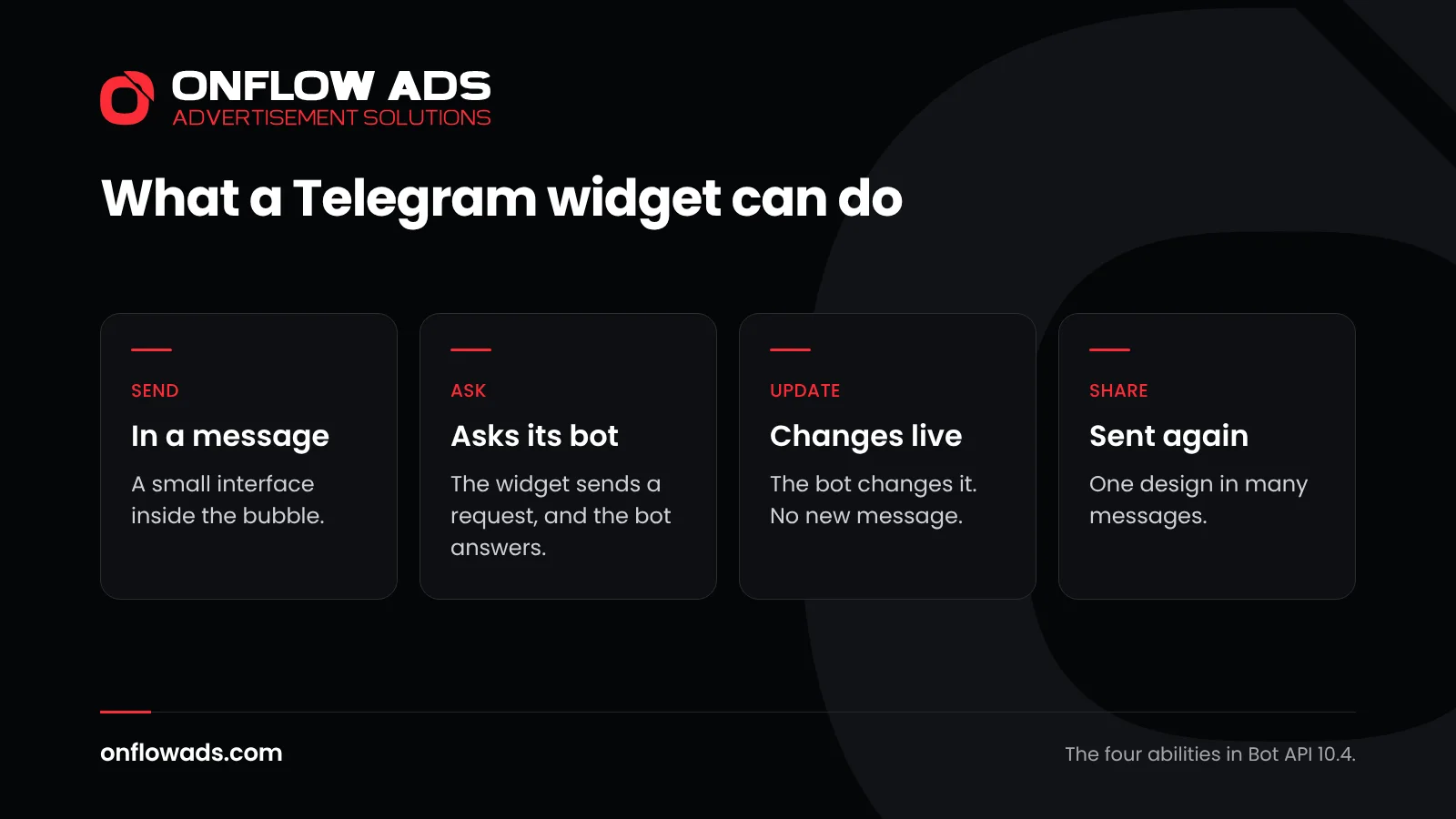
*The four abilities that Bot API 10.4 gives a widget.*
### 1. A bot sends a widget in a message
The new method [sendWidget](https://core.telegram.org/bots/api#sendwidget) lets a bot send a message that contains a widget. To the reader it is one message in the chat, like any other. The difference is that it can be used, not only read.
### 2. The widget asks, and the bot answers
A widget can send a query to its bot, and the bot replies with [answerWidgetQuery](https://core.telegram.org/bots/api#answerwidgetquery). This is what makes a widget more than a picture. The request is tiny, up to 64 bytes, and the bot has 15 seconds to answer it. A price ticker can ask for the latest price. A game can send a move.
### 3. The bot updates the widget in place
With [editMessageWidgetData](https://core.telegram.org/bots/api#editmessagewidgetdata) a bot changes the data a widget shows, and the message stays where it is. An order status can move from packed to shipped without a second message. A score can change while a game is played.
### 4. One shared widget, many messages
A shared widget is one design that a bot can send again and again with [sendSharedWidget](https://core.telegram.org/bots/api#sendsharedwidget). Telegram's guide compares it to a poll: "one object that any number of messages refer to". A change made once, with [editSharedWidgetData](https://core.telegram.org/bots/api#editsharedwidgetdata), reaches every message that uses it.
Telegram's announcement speaks of interactive tools, games and workflows. What gets built depends on developers, and the first widgets will show what the format is good for.
## What can a Telegram widget not do?
A widget is small on purpose. Telegram's guide lists firm limits, and most of them protect the reader. The script in a widget runs in a small engine of its own, "never in a WebView or browser context", and it has no way to reach the internet.
| Limit | What Telegram's guide says |
| --- | --- |
| No internet access | A widget cannot load anything from the network. Its one way out is a small request to its own bot |
| No outside files | Outside scripts, styles, fonts and images are never loaded. Pictures must be inside the widget itself |
| No forms, audio or video | Form fields, audio, video and embedded pages are removed |
| No scrolling, no full screen | What does not fit in the bubble is cut off |
| Size of the bubble | 200 to 600 pixels wide, and 50 to 600 pixels high |
| Size of the code | At most 32 KB of HTML |
| How often it may ask its bot | At most 5 requests in 5 seconds for each user |
*The limits Telegram sets on a widget*
Two more lines of the guide matter to anyone who uses a bot. The first is about privacy: the bot never learns "anything about a user who does not tap a widget". The second is about links: a widget can open a link only after you confirm it, and Telegram shows the address in full first.
For developers the guide adds a warning that belongs on the wall: treat the code and the shared data of a widget as public, and never put secrets in it.
## Where do Telegram widgets work today?
This is the part to read twice. Telegram says that widgets are rolling out in steps, and the first step is small. It decides what you can plan around.
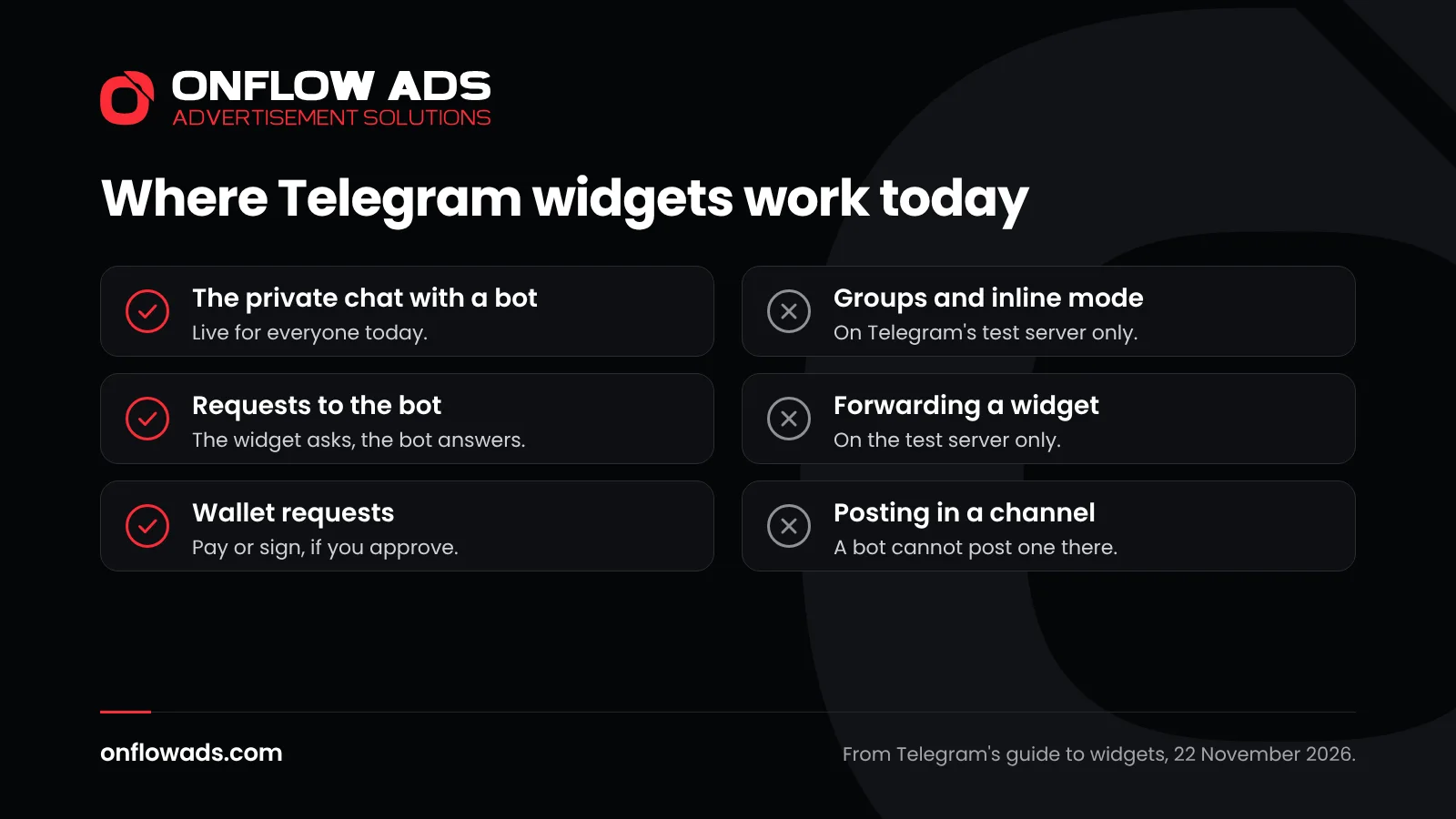
*What is live today, and what is not. From Telegram's guide to widgets, read on 22 November 2026.*
| Place | Live for everyone? | What Telegram says |
| --- | --- | --- |
| The private chat with the bot | Yes | "Currently, in the production environment, widgets work only in the private chat with the bot." |
| Groups | Not yet | On the test server only |
| Inline mode | Not yet | "Currently, widgets can't be sent in response to inline queries in the production environment." |
| Forwarding a widget | Not yet | On the test server only. A sent widget is protected for now, so it cannot be forwarded |
| Copying a widget message | No | Widgets cannot be copied |
| Posting a widget in a channel | No | "Widgets cannot be posted in channels, directly or via the bot, but users can forward widgets there." |
*Where Telegram widgets work in Bot API 10.4*
The test server is where Telegram lets developers try features before everyone gets them. So the table shows a direction as well as a limit: groups, inline mode and forwarding are built and waiting. Telegram has given no date for any of them, and plans can change.
> **A widget cannot be posted in a channel**
>
> If you run a channel, nothing changes in the channel itself. A bot cannot post a widget there, today or under the rules Telegram has published. The guide names one route for later: a person forwarding a widget into a channel, which works only on the test server now. Anyone who offers to put a widget in your channel posts today is selling something Telegram does not allow.
## Widgets, buttons and mini apps: what is the difference?
Telegram now has three ways to put something you can press in front of a reader. They are easy to confuse, so here they are side by side.
| | Buttons in a message | HTML widget | Mini app |
| --- | --- | --- | --- |
| What it is | Buttons placed inside or under a message | A small interface inside the message bubble | A web app that opens in its own window inside Telegram |
| Since | August 2026, in rich messages | November 2026 | Earlier years |
| Where it works | Private chats, groups and channels | The private chat with the bot, for now | Opened from a bot, a button or a link |
| Best for | One clear choice: open, buy, vote | A short task you finish in the chat | A full product: a shop, a game, a service |
*Buttons, widgets and mini apps on Telegram*
Buttons inside messages came with [Bot API 10.3](https://core.telegram.org/bots/api-changelog#august-24-2026) in August 2026. Telegram introduced them with the words "you can create apps that fit inside a single message", and said such messages can be [posted anywhere, including groups or channels](https://telegram.org/blog/welcome-messages-buttons-TG-13). [Mini apps](https://core.telegram.org/bots/webapps) are web apps that open inside Telegram. A widget sits between the two: more than a button, less than an app, and always inside the message.
For a channel this is the useful line to remember. Buttons work in a channel today. Widgets do not.
## What does Bot API 10.4 change for wallets and payments?
Telegram has a built-in wallet, on the TON blockchain. Bot API 10.4 connects widgets to it in two ways. In the words of the guide, a widget "can ask the user to pay or to sign through Telegram's built-in wallet".
- **A widget can ask the Wallet to act.** The announcement says widgets support signing, and notifying the bot about a user's transaction. The changelog lists three kinds of widget query: one with the user's wallet card, one with data signed by the user's wallet, and one that reports a sent transaction.
- **A bot can read a wallet card.** The announcement says bots can read users' wallet cards, including balances and NFT stickers, and can detect the service messages that Telegram shows for wallet transfers. The [wallet card](https://core.telegram.org/bots/api#tonwalletcard) is described in the Bot API.
For a shop that takes payment through a bot, this means the whole order can stay inside one message. For a user, it is a reason to slow down. A signature is a real action. Read what a widget asks your wallet to sign, and do not approve a request from a bot you do not know. Telegram's guide gives developers the same care in reverse: if a payment request times out, the payment may still have gone out, so check the order before asking anyone to pay again. [How to spot a scammer on Telegram](https://blogs.onflowads.com/spot-a-scammer-on-telegram) lists the warning signs, and [what escrow is on Telegram](https://blogs.onflowads.com/what-is-escrow-on-telegram) explains the safe way to pay a stranger.
## What are private replies to button presses?
Bots in groups have always had one problem: when one member presses a button, the answer lands in front of everyone. In July 2026 Telegram introduced [ephemeral messages](https://telegram.org/blog/communities-editor-invisible-messages), which only one member and the bot can see. [Bot API 10.2](https://core.telegram.org/bots/api-changelog#july-14-2026) describes them as group messages and commands visible only to a specific user and the bot.
Bot API 10.4 takes the next step. A button press can now trigger an ephemeral reply that only the person who tapped can see. The changelog says this works in any chat except a channel's direct messages, and it names the setting: [ephemeral message parameters](https://core.telegram.org/bots/api#ephemeralmessageparameters).
Telegram describes the use as custom reactive flows in shared chats, and its [overview of bot features](https://core.telegram.org/bots/features) says ephemeral messages let bots send private responses inside group chats. In practice a group can keep one message with buttons, and each member who presses one gets a private answer. A quiz can tell you your own score. A rules message can confirm that you accepted, without filling the chat. [Telegram channel vs group](https://blogs.onflowads.com/telegram-channel-vs-group) explains where each kind of chat fits.
## What else is new in Telegram Bot API 10.4?
The rest of the update is a list of smaller changes. These are the ones a channel owner or a bot owner is most likely to meet.
| Change | What it means |
| --- | --- |
| Quotes from rich messages | A bot can quote a chosen part of a formatted message when it replies, as people already can |
| Second usernames for bots | A Telegram Premium user can give up to two of their bots a second username that ends in agent, ai, app, game or gay |
| Links to a topic in a bot chat | A link can open one topic of your private chat with a bot. It opens only for you |
| Gifts by name | A bot can look up a unique gift by its name |
| New kinds of text | Telegram now marks a TON address and a bank card number in a message as their own kinds of text |
| Share themes | A bot can read the theme of the screen that shares a link to a user or a chat |
*Smaller changes in Telegram Bot API 10.4*
The full list is in the [changelog entry for 9 November 2026](https://core.telegram.org/bots/api-changelog#november-9-2026). If you build bots, read it there: it names every new method and field.
## How did Telegram bots get here? Four updates in 2026
Widgets did not arrive alone. They are the fourth step of a change that Telegram started in June 2026, when bot messages stopped being plain text.
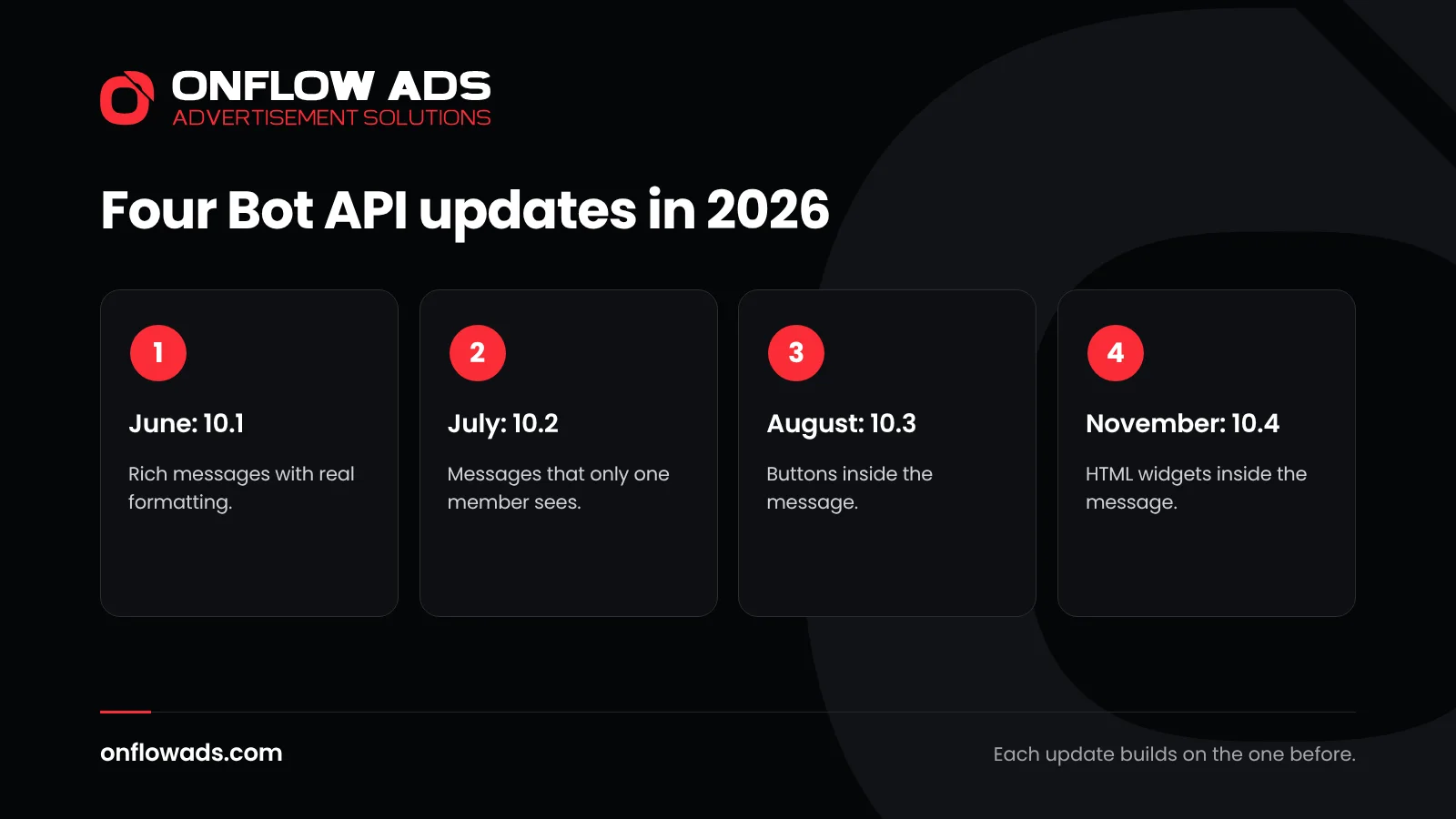
*Four Bot API updates in five months, each building on the one before.*
| Date | Version | Main addition |
| --- | --- | --- |
| 11 June 2026 | Bot API 10.1 | Rich messages: bot messages with real formatting |
| 14 July 2026 | Bot API 10.2 | Ephemeral messages in groups, and support for communities |
| 24 August 2026 | Bot API 10.3 | Buttons inside rich messages, and files in them |
| 9 November 2026 | Bot API 10.4 | HTML widgets, Wallet actions and private button replies |
*Telegram Bot API updates from June to November 2026*
Read in order, the direction is clear. First [rich text for bots](https://telegram.org/blog/watch-apps-and-more), then messages only one person sees, then buttons inside the message, and now an interface inside it. Each step moves more of a task into the chat, so that a reader has less reason to leave it.
## What does Bot API 10.4 mean for channel owners?
In your channel, nothing changes today. A bot cannot post a widget in a channel, and no channel setting is new. What changes is what a bot beside your channel can do in its private chats. Three steps make sense now.
1. **Keep doing what works in the channel** Posts with a clear first line, a picture and a button still do the work. [How to write a Telegram ad post](https://blogs.onflowads.com/how-to-write-a-telegram-ad-post) gives a structure, and [Telegram ad formats explained](https://blogs.onflowads.com/telegram-ad-formats) covers what a post can carry.
2. **Decide whether you need a bot at all** A widget only helps if readers have a reason to open a private chat with your bot: an order, a booking, a quiz, support. If the channel is the whole product, you do not need one. [Telegram welcome messages](https://blogs.onflowads.com/telegram-welcome-messages) shows a simpler way to greet new readers.
3. **If you have a bot, plan one small widget** Pick the one task people ask your bot for most, and make that a widget. Keep it short: a widget has no scrolling and no form fields. It cannot be forwarded yet, so it will not spread by itself: people reach it through your channel and your links. [Telegram invite links](https://blogs.onflowads.com/telegram-invite-links) explains how to tell where they came from.
One more point for owners who earn from their channel. Bots and mini apps already pay in Telegram Stars, and [Telegram Stars for channels](https://blogs.onflowads.com/telegram-stars-for-channels) and [how to make money on Telegram](https://blogs.onflowads.com/how-to-make-money-on-telegram) cover the ways. A widget does not add a new way to be paid. It makes the existing ones easier to use inside a chat.
## What does it mean for advertisers and bot builders?
A widget makes a bot better to use. It does not bring anyone to the bot. A widget lives in a private chat and cannot be forwarded yet, so every user still arrives the old way: through a link, a search or a channel they already read.
- **The first message matters more.** A person who opens your bot now can be handed something useful at once, where before they got a menu of commands.
- **Channels are still where people are found.** A bot has no feed of its own. The people you want are reading channels on your subject, and [finding Telegram channels for advertising](https://blogs.onflowads.com/telegram-channels-for-advertising) shows how to choose them.
- **Measure taps, not hopes.** Give every ad its own link and count what it brings. [How to track Telegram ad results](https://blogs.onflowads.com/track-telegram-ad-results) explains the method, and [Telegram Ads vs sponsored posts](https://blogs.onflowads.com/telegram-ads-vs-sponsored-posts) compares the two ways to buy attention.
- **Follow the rules for links.** Sending a bot's link to strangers can get an account limited. [Telegram spam limits](https://blogs.onflowads.com/telegram-spam-limits) explains where the line is, and [Telegram ad rules](https://blogs.onflowads.com/telegram-ad-rules) covers what an ad may say.
## Mistakes to avoid with Telegram widgets
- Paying for a widget in your channel posts. A bot cannot post one there.
- Building a widget before the bot has users. Fix how people find the bot first.
- Putting a whole shop in one widget. Nothing scrolls inside a widget, so a long task belongs in a mini app.
- Putting a password, a key or private data in a widget. Telegram says to treat its code as public.
- Approving a wallet request you did not expect. A signature cannot be taken back.
- Planning a campaign around features that Telegram has not released. Plan for what the changelog says today, and change the plan when it changes.
## How Onflow Ads helps with Telegram Bot API 10.4
Onflow Ads is an advertising and audience-growth platform for Telegram channels. It does not build widgets, and it does not send them: its work happens in channels, where a bot cannot post a widget. What it does is the part of the job that Bot API 10.4 leaves untouched, which is getting a channel or a bot in front of the right readers.
It also means you do not have to write a bot to use bot features in your marketing. Our bot does that work. It publishes each ad at the booked time and removes it when the run ends. Every link in an ad goes out as its own counted short link, buttons included. The number of buttons a post can carry grows with the plan, and button colours start at Plus: [post buttons and links](https://docs.onflowads.com/plans/post-buttons-and-links) has the table.
| What you want | What to use | What it costs |
| --- | --- | --- |
| A paid post in channels you choose | The Paid Promotions marketplace: pick channels by category, book a format, and the payment waits in escrow until the ad has run | The channel's price plus the marketplace fee, 9% today |
| Readers from channels like yours | Cross-promotion: two channels publish a post for each other, and the bot publishes both and removes both when the run ends | Free, unless your post links outside Telegram, which costs a flat $1 |
| Your ad in channels of a similar size and topic | The Subscriber Exchange: you host other members' ads and yours runs in their channels, once your channel has 1,000 subscribers | Hosting, not money. A placement costs nothing unless the ad links outside Telegram |
*Three ways to bring people to a bot or a channel on Onflow Ads*
An ad can link to any public Telegram address, and that includes a bot. A bot's address is a Telegram address, so a swap or an exchange post that points to your bot carries no link fee, and taps on the link are counted. [Tracked links and delivery proof](https://docs.onflowads.com/paid-promotion-advertisers/tracked-links-and-delivery-proof) shows where to read them. [The Telegram cross-promotion guide](https://blogs.onflowads.com/telegram-cross-promotion-guide) and [how a subscriber exchange works](https://blogs.onflowads.com/telegram-subscriber-exchange) explain the two free routes.
- [Get started free](https://onflowads.com/signup)
- [See how sponsored posts work](https://onflowads.com/telegram/paid-promotion)
A widget is one more thing a bot can do once a reader has arrived. [Telegram marketing in 2026: the complete guide](https://blogs.onflowads.com/telegram-marketing) covers how readers arrive, from setting up a channel to measuring every result.
## Frequently asked questions
### What is Telegram Bot API 10.4?
It is the version of Telegram's Bot API dated 9 November 2026. Its main addition is HTML widgets, small interactive interfaces that a bot can send inside a message. It also connects widgets to Telegram's Wallet and lets a button answer only the person who tapped it.
### When was Telegram Bot API 10.4 released?
On 9 November 2026. That is the date of its entry in Telegram's Bot API changelog, and Telegram announced it on its Bot News channel the same day.
### What is an HTML widget in Telegram?
It is a piece of interface, written in HTML, that sits inside a message bubble. It can have its own layout and parts you can press, it can ask its bot for information, and the bot can update it without sending a new message.
### Can I post a widget in my Telegram channel?
No. Telegram's guide says widgets cannot be posted in channels, directly or through the bot. It adds that people can forward a widget into a channel, but forwarding works only on Telegram's test server for now.
### Do Telegram widgets work in groups?
Not yet for everyone. Telegram's guide lists groups as available on its test server only. In the live app, widgets work only in the private chat with the bot. Telegram has given no date.
### Can a Telegram widget be forwarded?
Not yet. Forwarding works on Telegram's test server only, and in the live app a sent widget is protected, so it cannot be forwarded. A widget cannot be copied at all. People reach one by opening the bot that sends it.
### What is the difference between a widget and a mini app?
A mini app is a web app that opens in its own window inside Telegram. A widget stays inside the message bubble. A widget suits a short task that you finish in the chat, and a mini app suits a full product such as a shop or a game.
### Do I need Telegram Premium to use widgets?
The changelog does not tie widgets to Telegram Premium. The one part of Bot API 10.4 that needs Premium is the second username: a Premium user can give up to two of their bots a second username that ends in agent, ai, app, game or gay.
### What is an ephemeral reply in Telegram?
It is a bot message that only one person and the bot can see. Since Bot API 10.4 a button press can trigger one, so in a group each member who presses a button gets a private answer.
### Is a Telegram widget safe to open?
Telegram limits what a widget can do. It cannot reach the internet, it cannot load outside files, and a link opens only after you confirm it. A wallet request is still a real payment or signature, so read it, and do not approve one from a bot you do not know.
### Does Onflow Ads use Telegram widgets?
No. Onflow Ads works in channels, where a bot cannot post a widget. Its bot publishes ads and removes them on time, and every link in an ad is counted. Onflow Ads is an independent product and is not endorsed by, affiliated with or operated by Telegram.